
What It Is
The Answer Keys resource is a collection of all assessment questions, answer keys, and rubrics associated to the default Mastery Course.
WARNING: Customizations to default course assessments will not be captured in the Answer Keys resource associated with a course.
NOTE: Answer Keys are not in Credit Recovery or Cursive Handwriting.
How to Access It
Teachers can access Answer Keys for all graded activities directly within the Course Resources Folder. This is a hidden teacher resource.
How to Use It
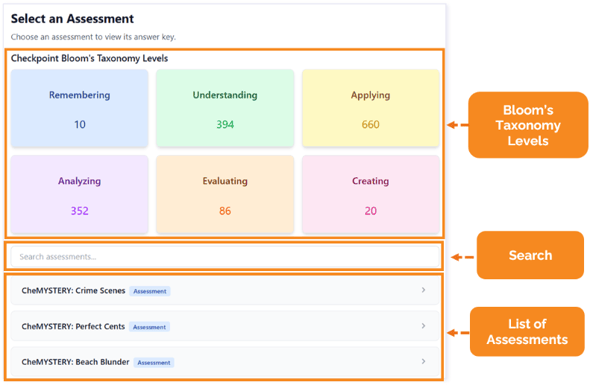
When you first open the Answer Keys resource, you will see tiles for Bloom’s Taxonomy Levels and a list of the assessments below them. A search bar sits between these sections to search for specific Checkpoints, Mastery, or upload Assess Its.
Search assessments
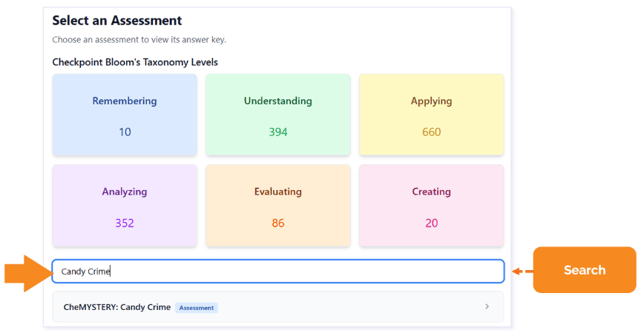
Use the search bar to locate a specific Checkpoint, Mastery, or upload Assess It by typing the name of the Assess It.
Online Assessments
Checkpoints and Mastery Assess Its (also known as online assessments) are listed by their numerical correlation. When you open an online assessment, such as a Mastery Assess It, you will see Bloom’s Taxonomy and Question Type tiles for all questions in the pool. You can filter the questions within these categories. Then, scroll down to see the questions and answers.
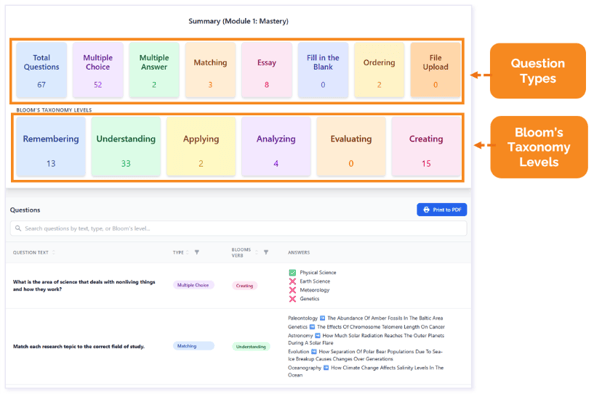
TIP: Checkpoints and Mastery Assessments draw from a larger pool of questions. While the Answer Key lists every possible question in the default course, each student's actual online assessment will only feature a random subset of them.
Navigation Tip
Use the Back to Assessments button to go back to the list of assessments.
Upload Assessments
Lesson-Level Assess Its (also known as upload assessments or Assessment) are listed by subtopic name and match the details in the Pacing Guide and/or Course Alignment Map.
NOTE: Lesson numbers are not included in this view.
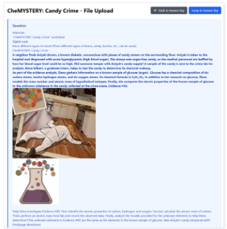
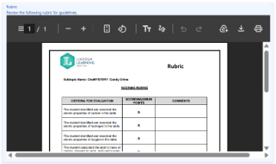
When you search and open an upload Assess It, you will see the assessment details first, associated rubrics, and then the Answer Key.
The Assess It and rubric appear at the top, and the Answer Key appears at the bottom.
Assess It
Rubric
Answer Key
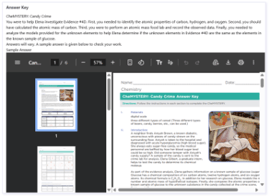
TIP: Click Jump to Answer Key to view this assessment's answers, or Back to Answer Key to view the full collection.

Please note the images found in this resource may not match your screen. Access and/or features may vary based on client contract.
© 2026 Lincoln Learning Solutions. All rights reserved.