
Check out this video to see what is inside Teacher Resources.
Top Facts
- Teacher Resources intentionally spiral key Student Resources while expanding on strategies for the classroom.
- Educators can access more than 25 linked resources to support both teaching and student success.
- Content is designed for teachers to support course use.
NOTE: A video tutorial will be added to this article shortly.
General Details
Teacher Resources provide quick access to essential course, technology, and support information for instructors. These resources help teachers troubleshoot common issues and manage course needs without having to contact support.
IMPORTANT: Blue, bolded terms link to resources.

Overview
Locating the Teacher Resources
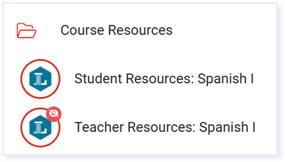
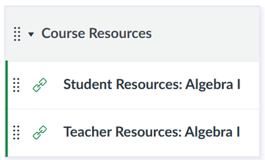
Teacher Resources are located in the first module or folder titled Course Resources. Open that folder, then select the Teacher Resources link.
| Buzz | Canvas |
 |
 |
Let’s Get Started
The Let’s Get Started section begins with a link to the Help Center for Getting Started for Teachers. This section combines general resources that apply across all subjects with course-specific materials tailored to each class. Additional resource links in this section mirror details found in the Student Resources.
Teacher Orientation
The Teacher Orientation is a collection of essential videos designed to support teacher training per LMS.

Click the links below to go directly to the orientation channels.
Course Alignment Map
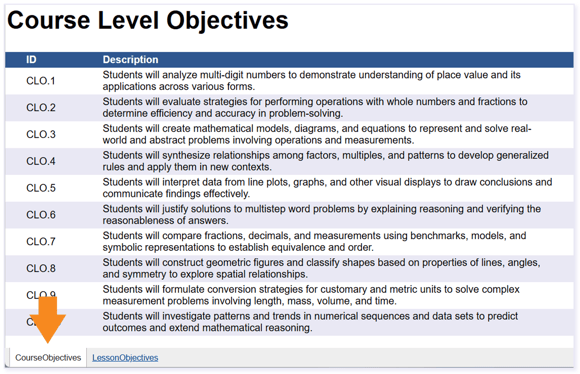
A useful resource in this section to highlight is the Course Alignment Map. There are two main tabs in this document. Course Objectives identifies the overarching objectives for the course.
A detailed Lesson Objectives tab lists the standards, course and module objectives, instructional materials, activities, assessments, and tools.
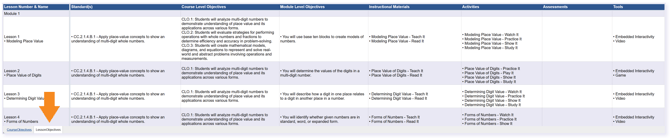
This tab helps teachers quickly understand how each learning object supports student progress throughout the course. It also makes it easy to distinguish instructional resources from activity‑based resources, which is especially useful when identifying materials that can support students who may be struggling.
Pacing Guide
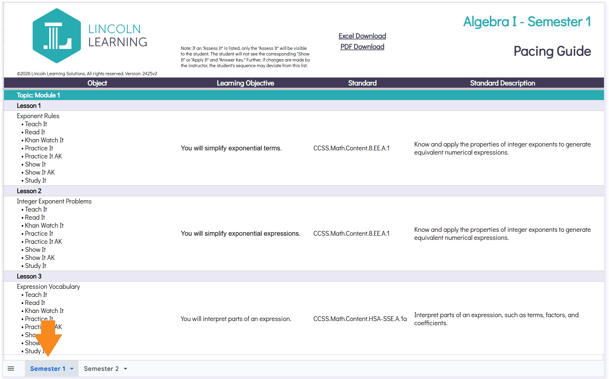
The Pacing Guide shows the full scope and sequence of each course. Use the tabs at the bottom of the document to switch between semesters. Understanding the Pacing Guide in our Help Center provides additional guidance.
NOTE: Depending on the course and grade level, this section may contain additional resources. For example, the Parent Guide accompanies our K-5 core courses and Social and Emotional Guides come with our K-2 core courses. Also, the Literacy in K-5 English Language Arts resource can be found in ELA K-5 courses.
Teacher Guide
The Teacher Guide serves as a comprehensive resource that supports teachers delivering high-quality, standards-aligned instruction. It supports the teacher with lesson organization, instructional delivery, assessment, and differentiation for each lesson. The guide includes objectives, materials, and multiple ways to support students within each lesson. The teacher can deliver consistent instruction while offering engaging, inclusive, and meaningful learning experiences for all students.
NOTE: Physical Education, Honors, and Credit Recovery courses do not have Teacher Guides at this time.
Other Materials Found in Teacher Resources
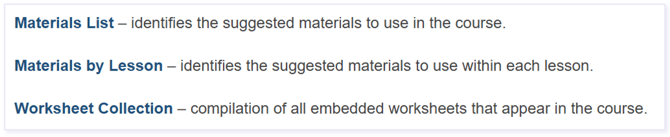
Materials and worksheets are included in each Learning Object. Use these links to view full collections.
Communicating With and Supporting Students
This section provides guidance for communicating with and supporting students, including classroom setup, expectations, feedback, and accommodations.
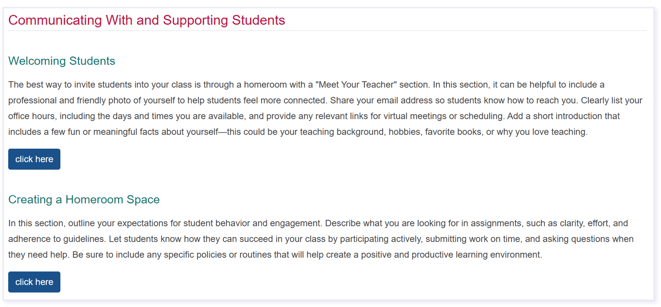
Each click here button expands to reveal detailed strategies and examples applicable to the course. The expanded details include explanations and examples related to that topic.
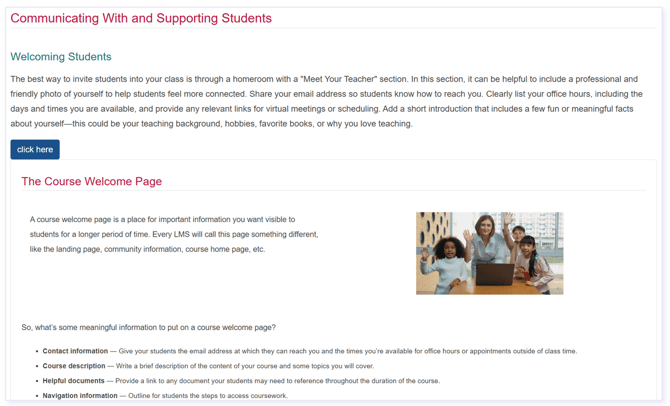
Welcoming Students
Teachers help students feel welcome, including a friendly photo, contact information, office hours, and a brief introduction. Recommendations for creating a welcoming course home page, including key information such as contact details, a brief introduction, and office hours.
Creating a Digital Homeroom Space
Clear communication of expectations for behavior, participation, and assignments sets students up for success. Teachers can create an interactive homeroom space outlining how to stay engaged, submit work on time, and ask for help.
Office Hours and Communication
Establishing regular office hours provides dedicated time for students to seek support and ask questions.
Effective Feedback when Grading
Support is available for communication regarding grading, including contact expectations, response times, and grading practices. Guidance is also provided on how to encourage student outreach regarding grades and feedback.
Progress Monitoring
Regular monitoring of student progress through grade and pacing reviews supports ongoing success.
Accommodations and Modifications
Support is available to address diverse student needs through built-in accommodations and adjustments within the learning platform.
Student Interaction Opportunities
The Student Interaction Opportunities section includes Discussions and Groups resources that support regular and substantive interaction among students, teachers, and course content through discussions, collaboration, reflection, and active learning opportunities. It also includes suggestions on supportive Tools that help foster engagement, communication, and meaningful participation throughout the course.
Technology Information
The Technology Information section includes access to technical support resources, contact options, and essential technology information, along with key Lincoln Learning policies, system requirements, and accessibility statements.
Please note the images found in this resource may not match your screen. Access and/or features may vary based on client contract.
© 2026 Lincoln Learning Solutions. All rights reserved.